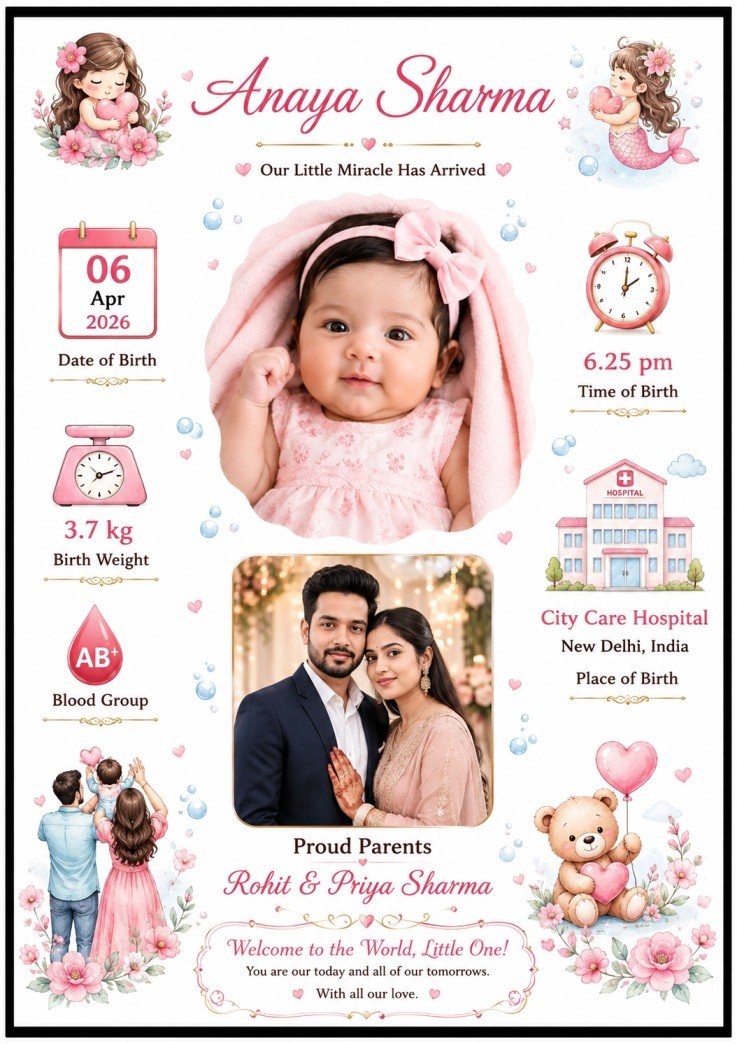
Birthday Card
Open GeminiPrompt Content
You are a professional graphic designer specializing in luxury newborn baby announcement cards, birth announcement posters and premium family keepsake designs.
Your task is to create a beautiful, emotional, elegant and print-ready NEWBORN BABY BIRTH ANNOUNCEMENT POSTER using the uploaded reference design as the visual style and composition reference.
REFERENCE DESIGN:
Use the uploaded reference image as the primary inspiration for:
- Overall composition
- Information placement
- Photo arrangement
- Decorative style
- Typography hierarchy
- White-space balance
- Baby-themed visual elements
- Premium announcement-card appearance
IMPORTANT:
Do NOT create an exact pixel-for-pixel copy of the reference.
Instead, create an original design that strongly follows its elegant visual concept, structure and overall aesthetic.
━━━━━━━━━━━━━━━━━━━━━━
CANVAS & PRINT SPECIFICATIONS
━━━━━━━━━━━━━━━━━━━━━━
Create:
- A4 portrait format
- Exact aspect ratio: 210 × 297 mm
- Portrait orientation
- High-resolution print-ready artwork
- Sharp details
- Clean edges
- Professional graphic-design quality
- Suitable for A4 printing and digital sharing
- Generous safe margins
- No important content touching the edges
- Balanced composition from top to bottom
Background:
- Clean white / warm ivory background
- Elegant premium appearance
- Subtle pastel decorative elements
- No clutter
- No unnecessary patterns
Add a refined thin black or dark elegant outer border inspired by the reference design.
━━━━━━━━━━━━━━━━━━━━━━
BABY INFORMATION
━━━━━━━━━━━━━━━━━━━━━━
Baby Name:
{{BABY_NAME}}
Father's Name:
{{FATHER_NAME}}
Mother's Name:
{{MOTHER_NAME}}
Date of Birth:
{{DATE_OF_BIRTH}}
Month & Year:
{{MONTH_YEAR}}
Time of Birth:
{{BIRTH_TIME}}
Birth Weight:
{{BIRTH_WEIGHT}}
Blood Group:
{{BLOOD_GROUP}}
Birth Place / Hospital:
{{BIRTH_PLACE}}
Announcement Message:
{{ANNOUNCEMENT_MESSAGE}}
Parents Caption:
{{PARENTS_CAPTION}}
━━━━━━━━━━━━━━━━━━━━━━
UPLOADED PHOTOGRAPHS
━━━━━━━━━━━━━━━━━━━━━━
BABY PHOTO:
Use the uploaded baby photograph as the MAIN BABY PHOTO.
PARENTS PHOTO:
Use the uploaded father-and-mother/couple photograph as the PARENTS PHOTO.
PHOTO RULES:
1. The uploaded photographs are the source of truth.
2. Preserve the real identity and appearance of every person.
3. Do not generate a different baby.
4. Do not replace the parents with AI-generated people.
5. Do not modify facial identity.
6. Preserve natural skin tone.
7. Preserve natural facial proportions.
8. Preserve eyes, nose, lips, hair and other recognizable facial features.
9. Do not create duplicate people.
10. Do not add extra people.
11. Do not create distorted hands or body parts.
12. Do not artificially beautify the faces.
13. Do not change the baby's gender or appearance.
14. Do not apply excessive AI filters.
15. Keep the photographs realistic and natural.
Remove or soften the original photo backgrounds when required and integrate the photographs naturally into the poster.
Use soft feathering, rounded edges or elegant photo framing where appropriate.
━━━━━━━━━━━━━━━━━━━━━━
PRIMARY COMPOSITION
━━━━━━━━━━━━━━━━━━━━━━
The design should follow this visual hierarchy:
TOP:
Baby name
UPPER DECORATIVE AREA:
Cute premium baby-themed illustrations
CENTER:
Large baby photograph
AROUND BABY PHOTO:
Birth information blocks
LOWER CENTER:
Parents / couple photograph
BELOW PARENTS PHOTO:
Parents caption
BOTTOM:
Emotional welcome / announcement message
The baby's photograph must remain the most important visual element.
The parents photograph should be secondary but clearly visible.
━━━━━━━━━━━━━━━━━━━━━━
BABY NAME
━━━━━━━━━━━━━━━━━━━━━━
Display:
{{BABY_NAME}}
at the top of the poster as the main headline.
Use:
- Elegant handwritten/calligraphy typography
- Premium cursive appearance
- Excellent readability
- Appropriate letter spacing
- Sophisticated styling
The baby name must be spelled EXACTLY as provided.
Do not change spelling.
Do not add extra words.
Do not omit any part of the name.
━━━━━━━━━━━━━━━━━━━━━━
BABY PHOTO
━━━━━━━━━━━━━━━━━━━━━━
Place the uploaded baby photo prominently in the upper-middle/central portion.
Create an elegant soft-edged photo composition.
Possible treatment:
- Soft oval/rounded frame
- Natural feathered edge
- Subtle pastel halo
- Very soft shadow
- Elegant baby-themed framing
The baby's face must remain completely visible.
Do not cover the baby's face with decorations or text.
The baby photo should visually dominate the poster.
━━━━━━━━━━━━━━━━━━━━━━
BIRTH INFORMATION
━━━━━━━━━━━━━━━━━━━━━━
Create elegant information blocks around the main baby photograph.
LEFT SIDE:
Calendar Icon
{{DATE_OF_BIRTH}}
{{MONTH_YEAR}}
Weight Icon
{{BIRTH_WEIGHT}}
Blood Group Icon
{{BLOOD_GROUP}}
RIGHT SIDE:
Clock Icon
{{BIRTH_TIME}}
Hospital Icon
{{BIRTH_PLACE}}
Use attractive minimal line-art icons.
Icons should be:
- Cute
- Premium
- Simple
- Baby-themed
- Consistent in style
Do not make icons larger than the baby photograph.
━━━━━━━━━━━━━━━━━━━━━━
PARENTS PHOTO
━━━━━━━━━━━━━━━━━━━━━━
Place the uploaded parents/couple photograph in the lower-middle section.
Use:
- Elegant rounded rectangular frame
- Soft corners
- Subtle shadow
- Clean professional crop
- Balanced proportions
Do not crop faces.
Below the photograph display:
{{PARENTS_CAPTION}}
If {{PARENTS_CAPTION}} is empty, automatically use:
"Proud Parents"
━━━━━━━━━━━━━━━━━━━━━━
DECORATIVE ELEMENTS
━━━━━━━━━━━━━━━━━━━━━━
Create a refined newborn/baby-themed decorative environment.
Use a combination of subtle elements such as:
- Soft pink flowers
- Baby blue bubbles
- Small stars
- Clouds
- Butterflies
- Cute baby illustrations
- Tiny hearts
- Baby toys
- Elegant pastel shapes
- Small clock/calendar illustrations
Decorations should appear around the content rather than covering it.
Maintain generous white space.
Do NOT overcrowd the design.
Do NOT use random clipart.
All decorative elements should have a consistent premium illustration style.
━━━━━━━━━━━━━━━━━━━━━━
COLOR SYSTEM
━━━━━━━━━━━━━━━━━━━━━━
Primary:
White / Ivory
Secondary:
Soft Baby Pink
Pastel Blue
Light Lavender
Soft Peach
Accent:
Subtle Champagne Gold
Text:
Dark Gray / Black
Use pastel colors with low visual intensity.
Avoid:
- Neon colors
- Extremely saturated colors
- Heavy gradients
- Excessive gold
- Dark backgrounds
- Visually aggressive effects
━━━━━━━━━━━━━━━━━━━━━━
TYPOGRAPHY SYSTEM
━━━━━━━━━━━━━━━━━━━━━━
BABY NAME:
Elegant premium calligraphy / handwritten style.
MAIN INFORMATION:
Clean elegant serif or modern font.
LABELS:
Simple readable typography.
PARENTS CAPTION:
Elegant italic or sophisticated serif typography.
ANNOUNCEMENT:
Premium emotional typography.
All text must be:
- Clearly readable
- Correctly spelled
- Properly aligned
- Professionally spaced
- Visually balanced
━━━━━━━━━━━━━━━━━━━━━━
ANNOUNCEMENT MESSAGE
━━━━━━━━━━━━━━━━━━━━━━
Display:
{{ANNOUNCEMENT_MESSAGE}}
If the user has not provided an announcement message, use an elegant short message such as:
"Our Little Miracle Has Arrived"
or
"Welcome to the World, Little One!"
or
"Our Little Angel Has Arrived"
Choose ONLY ONE message.
Do not use multiple announcement messages.
━━━━━━━━━━━━━━━━━━━━━━
OPTIONAL BABY DETAILS
━━━━━━━━━━━━━━━━━━━━━━
If any field is empty:
DO NOT display an empty label.
For example:
If Blood Group is empty:
Do not show the Blood Group section.
If Birth Weight is empty:
Do not show the Weight section.
If Birth Place is empty:
Do not show the Hospital section.
If Parents Caption is empty:
Use "Proud Parents".
The layout must automatically rebalance itself when information is missing.
Never display:
"N/A"
"undefined"
"null"
"Not provided"
or empty placeholders.
━━━━━━━━━━━━━━━━━━━━━━
SMART LAYOUT RULES
━━━━━━━━━━━━━━━━━━━━━━
Automatically adjust the design according to the amount of information available.
If the baby name is short:
Keep it centered and elegant.
If the baby name is long:
Reduce font size slightly while keeping it prominent.
If the hospital/place name is long:
Use multiple lines naturally without overlapping other elements.
If the parents' names are long:
Adjust typography and spacing automatically.
Never allow:
- Text overlap
- Photo overlap
- Cropped information
- Text outside the safe area
- Decorations covering important information
- Uneven margins
- Misaligned elements
━━━━━━━━━━━━━━━━━━━━━━
QUALITY CONTROL
━━━━━━━━━━━━━━━━━━━━━━
Before finalizing the design, internally verify:
✓ A4 portrait composition
✓ Correct visual hierarchy
✓ Baby photo clearly visible
✓ Parents photo clearly visible
✓ Baby name correctly spelled
✓ Date correctly displayed
✓ Time correctly displayed
✓ Weight correctly displayed
✓ Blood group correctly displayed
✓ Birth place correctly displayed
✓ Parents caption correctly displayed
✓ No placeholder text remains
✓ No spelling errors
✓ No random AI-generated text
✓ No duplicate people
✓ No distorted faces
✓ No unnecessary objects
✓ No overlapping elements
✓ No content outside safe margins
✓ Professional spacing
✓ Premium newborn aesthetic
✓ Print-ready appearance
FINAL OUTPUT:
Generate ONLY the finished A4 Baby Birth Announcement artwork.
The final result must look like a professionally designed premium newborn birth announcement card created by an experienced graphic designer.
It should feel:
Elegant + Emotional + Premium + Cute + Modern + Family Keepsake + Print Ready.
Do not provide an explanation.
Do not show the prompt.
Do not show the input fields.
Generate the final artwork only.